
Xbox Ones Preview-program får en hel drös nya funktioner idag. Några av nyheterna är att man äntligen kan se vilka som är med i en grupp innan man själv hoppar in, vi kommer att få ledarlistor för achievements, det ska bli lättare att kolla på vänners Twitch-streamar, systemet för föreslagna vänner ska förbättras och mycket annat. Hela listan på nyheter kan du se här:
"See Who's In a Party
In the new update, you'll be able to see who is in a party that your friends are in. Just click the "Chat" button that appears below the user, and you'll be shown a "Party Details" screen.
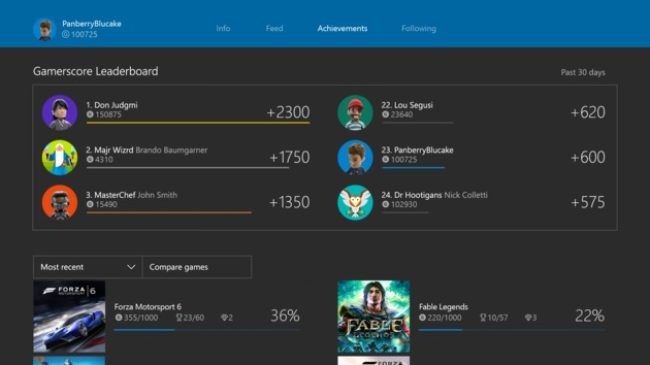
Gamerscore Leaderboard
Back once again, the popular Gamerscore Leaderboard, which shows how you're doing against your friends, will return. It'll appear at the top of the achievements list on your profile. Just head to "View Achievements" on your profile to see it.
Offline and Rearrangeable Pins
Pins will now be accessible when your console is offline. Not only that, but you'll be able to rearrange them without needing to use SmartGlass or anything like that.
Joinable Twitch Broadcasts
If your friend is broadcasting on Twitch via their Xbox One, you'll be able to fire up their stream with a press of a button, rather than needing to find them manually in the Twitch app.
Suggested Friends Improvements
Suggested Friends will be getting a bit of an overhaul. It'll appear under "Friend Suggestions" in the Community area, and also in the Friends list in the Guide. You'll see the name, gamertag, and gamerpic of the person that's being suggested, as well as a reason why they were recommended to you.
Hide Games from Ready-To-Install List
This returns from the old UI and will work in the same way as it did before. You can hover over an item in the ready to install list, press the menu button, and choose to hide it.
Avatar Store
On both the Xbox One console and in the Xbox Windows 10 app, you'll be able to visit the Avatar store to purchase new apparel and things for your Avatar. The complete catalogue will be available, including free items and a few new items. You'll be able to preview items on your Avatar before you buy, of course.
Xbox News
In your Activity Feed, you'll start to see "Xbox News" posts direct from Microsoft, including information on console updates, game releases, and tournaments. This will appear in the Activity Feed in the Xbox Windows 10 app, too.
Trending Changes
On both the Xbox One console and in the Xbox app, a new area for "Trending" items will be available. It'll appear on the left menu in the Xbox App and to the right of the Community tab on the Xbox One console. This area will show popular topics, top videos, screenshots, achievements, and more."
Det lär dröja ett tag innan alla vanliga Xbox One-ägare får tag på dessa funktioner, men om Preview-programmets försökskaniner inte stöter på några större fel lär det inte dröja allt för länge.
Tack Pure Xbox